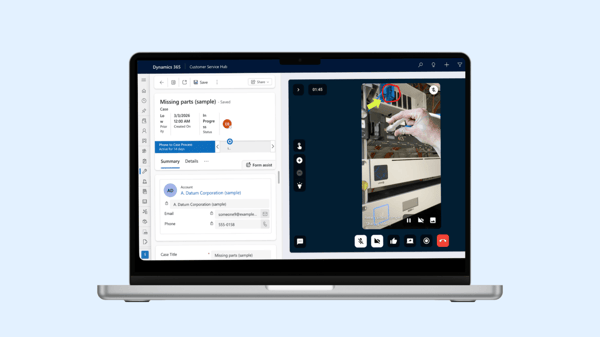
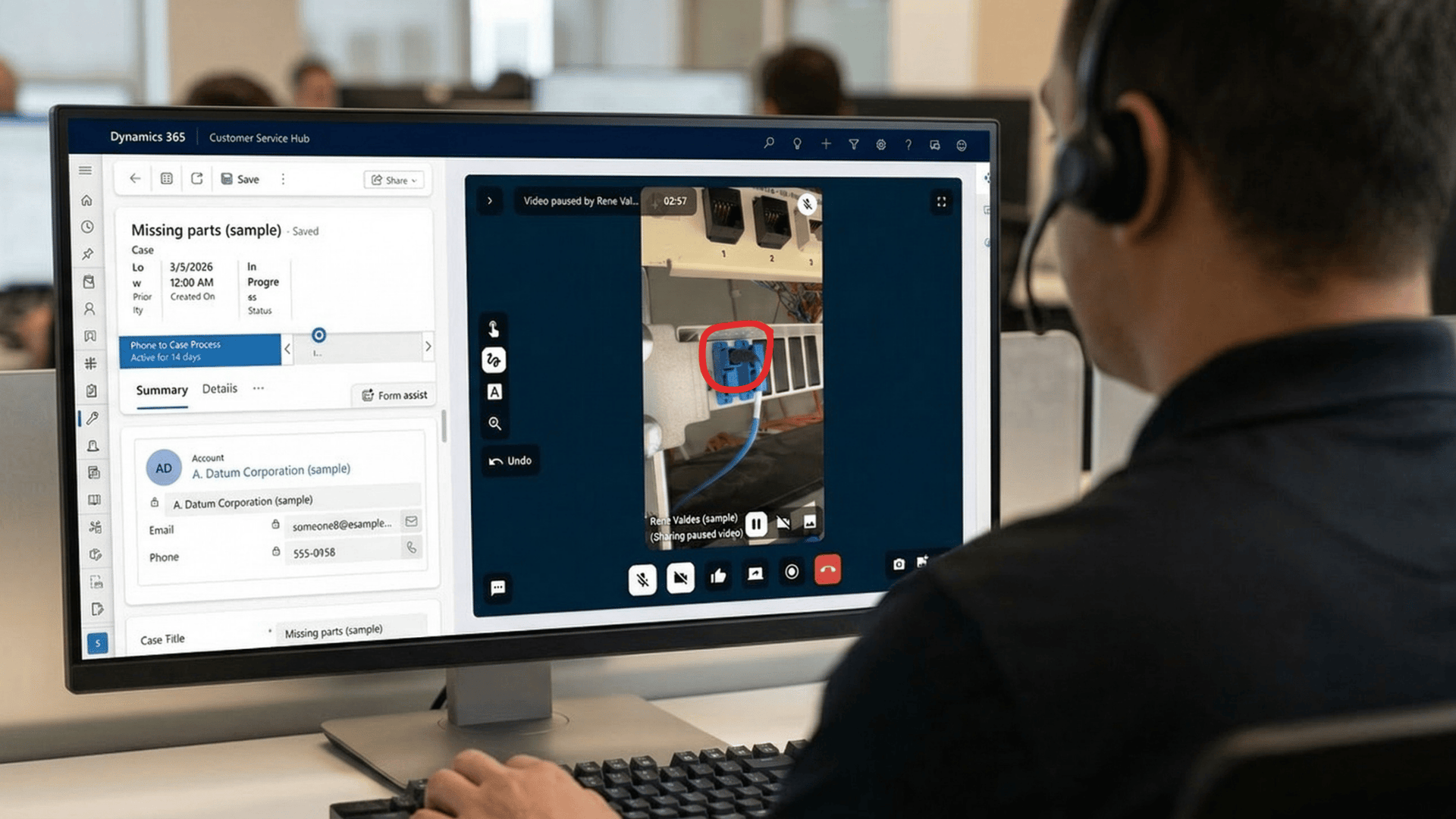
With Microsoft Dynamics 365 Remote Assist approaching its end-of-support deadline, organizations must find a seamless, enterprise-ready visual support alternative. XMReality offers a fully integrated replacement that connects remote experts and field technicians directly within Microsoft Dynamics 365 Customer Service and Field Service workflows.
Why Remote Assist users need a replacement
Microsoft has officially deprecated Dynamics 365 Remote Assist, with all subscriptions and applications reaching their final end of support on December 31, 2026. Subscriptions and annual renewals closed on November 1, 2025, following the earlier phase-out of the standalone Remote Assist mobile application. While existing session data remains stored within customer Dataverse environments, the applications themselves will cease functioning entirely after the 2026 deadline.
For equipment manufacturers and technical service providers that rely on visual guidance to triage issues and assist technicians in the field, this creates an immediate operational challenge.
Microsoft’s official lifecycle guidance suggests two paths: basic spatial annotations inside Microsoft Teams mobile, or third-party mixed reality solutions available on Microsoft Marketplace. However, Teams mobile spatial annotations are not built for enterprise field operations—they lack native embedding inside Dynamics cases and work orders, do not automatically sync structured visual records to Dataverse, and require guest users to install and authenticate through Microsoft Teams.
XMReality provides a fully integrated, certified replacement that embeds visual assistance directly into Microsoft Dynamics 365 Customer Service and Field Service.
XMReality vs. Dynamics 365 Remote Assist and Teams mobile
When migrating from Remote Assist or introducing visual support into Dynamics 365 Customer Service Hub, service organizations require seamless CRM workflows, fast connectivity, and clear visual collaboration tools.
|
Dynamics 365 Remote Assist (Deprecated) |
Microsoft Teams mobile (Basic annotations) |
XMReality for Dynamics 365 |
|
|
Lifecycle status |
End of support December 31, 2026 |
Active core Teams feature |
Fully supported ISV application |
|
Dynamics 365 embedding |
Model-driven canvas integration |
External meeting app; no CRM embed |
Embedded in Customer Service Cases & Work Orders |
|
Guest access friction |
Required guest tenant setup or app install |
Requires Teams mobile app download |
Zero downloads; browser link via SMS or WhatsApp |
|
Dataverse & CRM logging |
Native snapshot storage |
Manual exports and disconnected chat files |
Automatic attachment of photos, video, transcripts, and AI notes |
|
Guiding tools |
3D spatial ink, pointers |
Basic 2D/3D screen drawing |
Hands Overlay, AR pointers, step-by-step checklists |
|
Hardware flexibility |
Built for HoloLens 2; mobile deprecated |
Smartphones and tablets only |
Smartphones, tablets, PC, and smart glasses |
|
Procurement channel |
Legacy direct Microsoft licensing |
Microsoft 365 standard tier |
Microsoft Marketplace / AppSource & direct invoicing |
Key advantages of XMReality for Dynamics 365 users
1. Embedded directly in the Dynamics workflow
With XMReality installed in Dynamics 365, support agents and field dispatchers launch remote visual calls without leaving their active Case or Work Order. This single-interface workflow prevents context switching and maintains complete visibility over service histories.
2. Zero-friction connectivity for customers and technicians
Legacy mixed reality tools often failed during customer-facing support because they required the remote participant to download software, create accounts, or configure permissions. With XMReality, an agent sends a secure link via SMS or email directly from Dynamics. The recipient clicks the link and joins instantly through their web browser on any mobile device with no app installation required.
3. Precision guiding for faster problem resolution
Explaining complex mechanical assemblies over a standard phone or video call is prone to error. XMReality provides real-time augmented reality guiding tools, including:
-
Hands Overlay: Project your actual hands into the user's camera view to show exact physical movements, tool positions, and adjustments.
-
Real-time pointers and annotations: Pinpoint specific valves, wiring terminals, or display panels on frozen or live video frames.
- Step-by-step instructions: Push customizable checklist procedures directly onto the operator's display to guarantee adherence to quality and safety standards.
4. Automated Dataverse documentation
Manual post-call reporting is one of the largest sources of lost field service data. XMReality automates service record creation by automatically saving session assets directly to the originating Dynamics 365 record upon call completion:
-
High-resolution marked-up snapshots
-
Full video recordings
-
AI-generated call summaries and transcripts
-
Automated PDF service reports
This structured data builds an easily accessible knowledge base across your service department without requiring manual uploads.
5. Hardware agnostic across mobile and smart glasses
Unlike solutions tied to specific head-mounted hardware, XMReality operates across standard desktop computers, iOS and Android smartphones, tablets, and leading industrial smart glasses from vendors like RealWear and Vuzix. Field technicians can use smart glasses for hands-free maintenance, while external customers can connect using their everyday smartphones.
For more information about the smart glasses, click here.
How equipment manufacturers use XMReality in Customer Service Hub
For industrial equipment manufacturers and technical service organizations using Dynamics 365 Customer Service Hub, visual support transforms Tier 1 and Tier 2 resolution workflows:
-
Initial triage: When an equipment fault is reported, support agents initiate an XMReality call directly from the Dynamics Case record.
-
Visual inspection: The agent inspects error codes, physical wear, and machine configurations in real time, avoiding misunderstandings from verbal descriptions.
-
Remote resolution: The agent guides the on-site operator through basic adjustments, component resets, or verification steps using AR pointers and Hands Overlay.
-
Targeted dispatch: If an on-site visit remains necessary, the field engineer arrives with the exact diagnostic snapshots, part numbers, and error context already logged in the Dynamics Work Order.
This workflow directly improves First-Time Fix Rates (FTFR), reduces non-essential travel costs, and shortens Mean Time to Repair (MTTR).
Procurement and implementation
XMReality is a certified Microsoft partner application. Organizations can deploy and license the solution through two standard paths:
-
Microsoft Marketplace: Purchase and activate XMReality licenses directly through Microsoft AppSource / Marketplace. Charges appear on your standard monthly or annual Microsoft invoice and can draw down against existing Microsoft Azure Consumption Commitments (MACC).
-
Direct ISV agreement: Contract directly with XMReality for enterprise-wide rollouts, custom onboarding, and specialized integrations.
Setup requires no complex development: simply install the XMReality app within your Microsoft Dynamics environment to enable visual assistance across your support and field service teams.
For more information see Microsoft Dynamics.