XMReality in Microsoft Dynamics

XMReality in Microsoft Dynamics

Video support at the speed of Dynamics

Seamlessly make XMReality video calls directly from your Dynamics workspace. Capture documentation automatically and resolve issues faster, all within the system your team already uses.
Technical support loses momentum when experts can’t see the problem and documentation gets lost when it’s stuck in a standalone system.

XMReality for Dynamics embeds high-definition video calls with advanced guide tools and simple text message call invites, directly into your existing workflow

  • One-click video: Invite anyone with just a text message, right from within Microsoft Dynamics

  • Smart documentation: Videos, photos, transcripts and notes auto-attach to the record

  • Zero friction: No app downloads or registrations for your customers
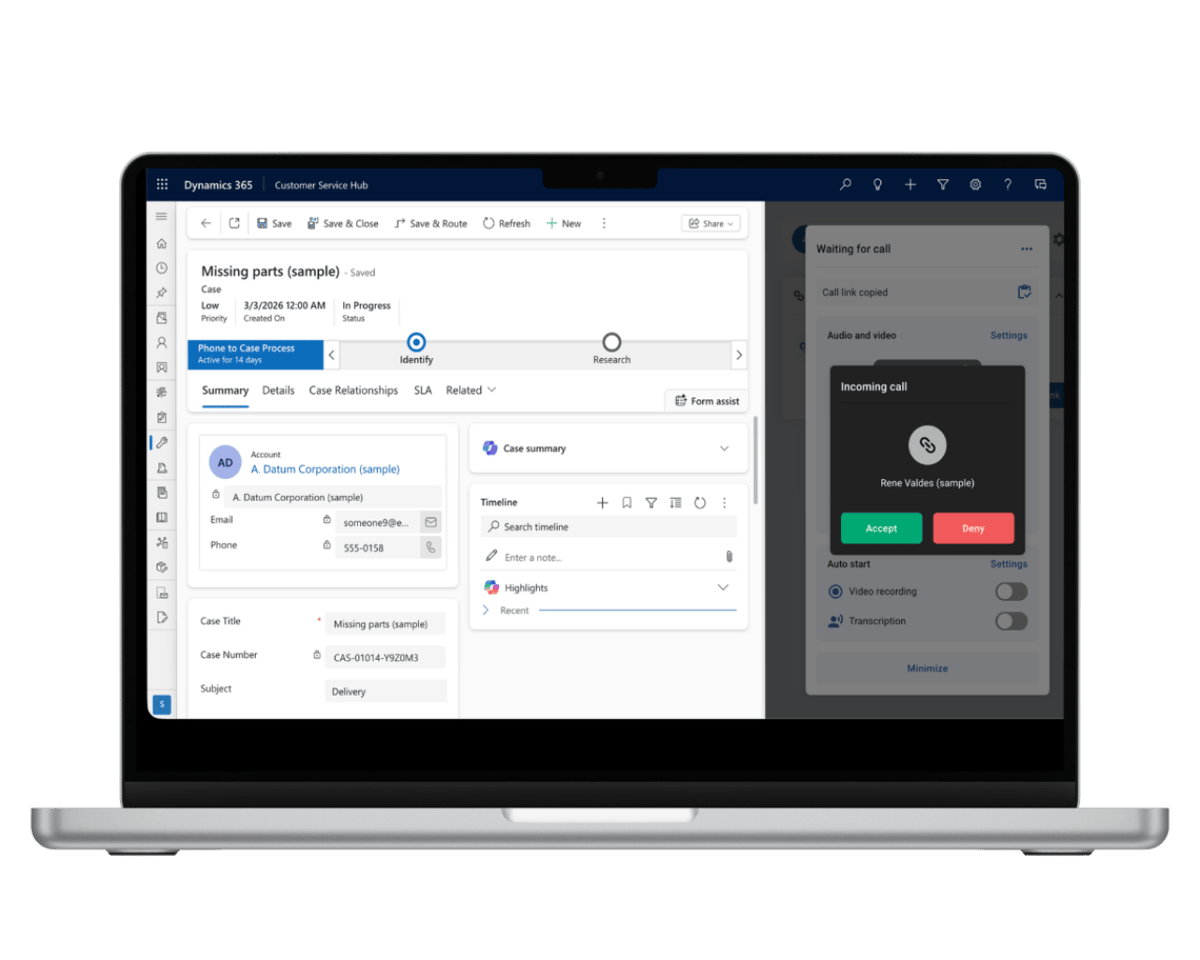
Incoming call Dynamics

Connect instantly from Dynamics

XMReality removes the friction between your CRM and your customer.

Send a video call link right from the Dynamics interface, by text message, WhatsApp or any existing communication channel. Your customer simply taps the link to immediately start a secure, high-definition, video call. No logins, no downloads, and no accounts, just instant visual support.

Powerful features for better collaboration

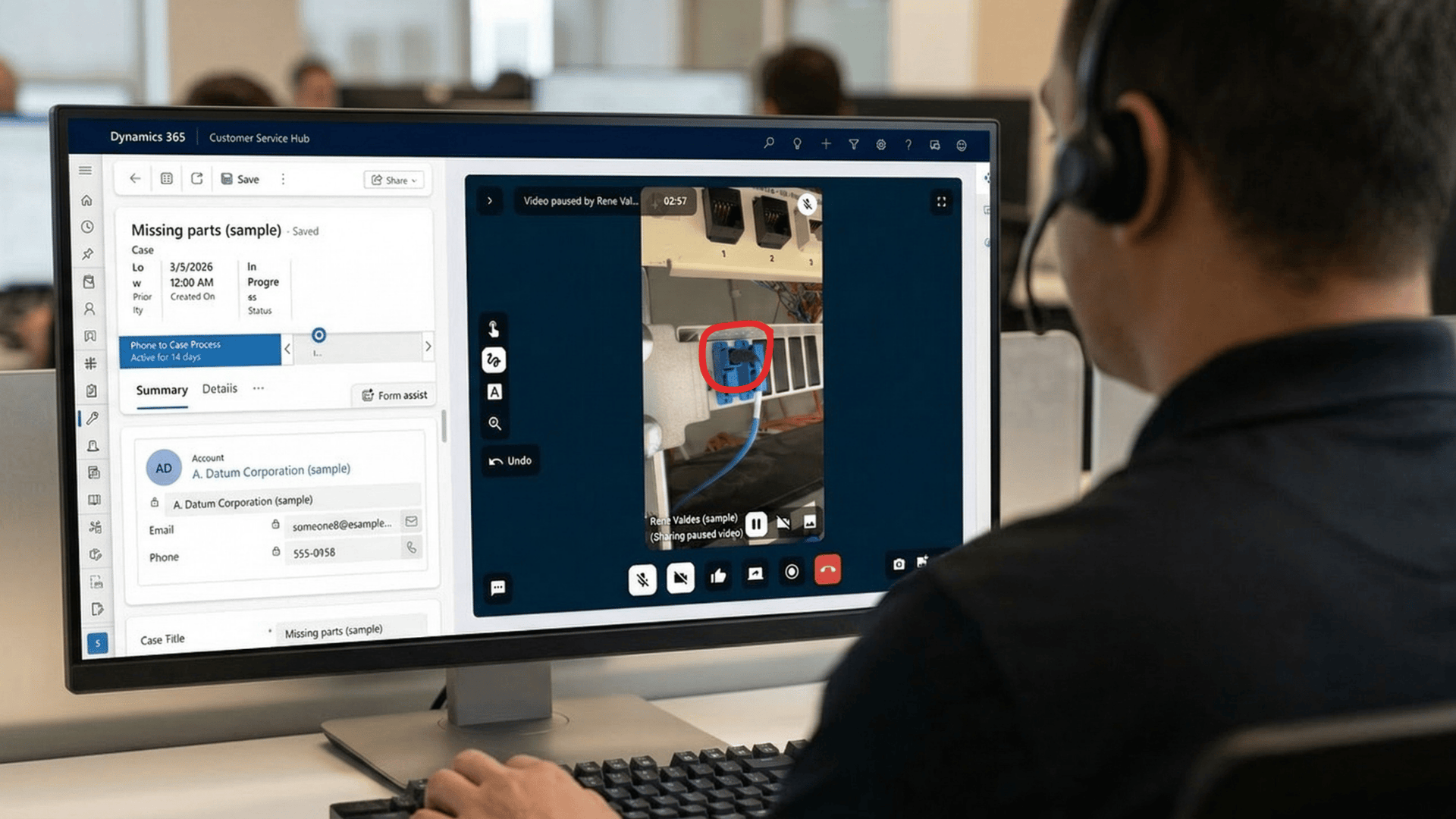
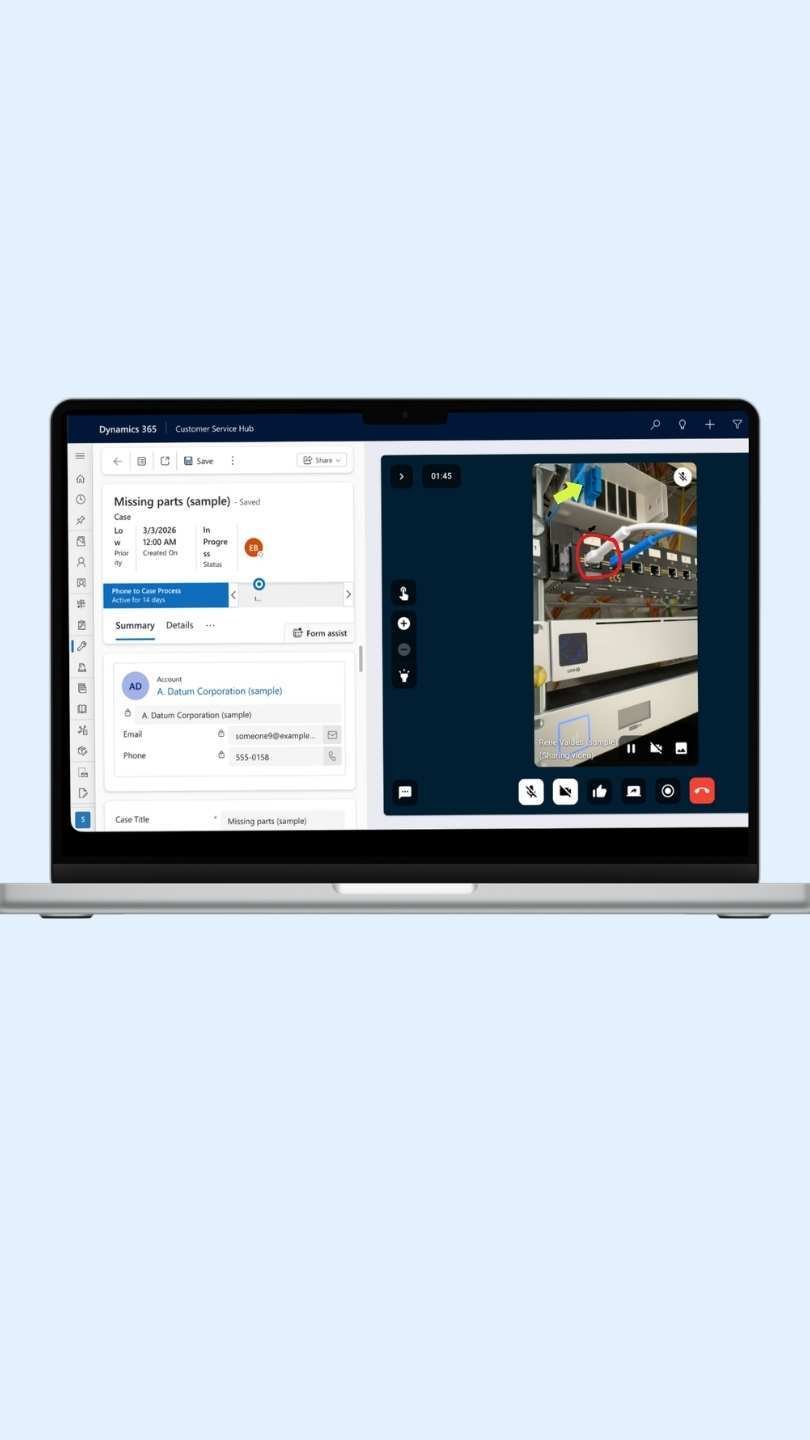
XMReality is more than just video, it’s a precision tool for remote resolution. Guide technicians using powerful features to show exactly where to turn or adjust.

Pause live video to highlight and zoom in on critical details, or use real-time annotations to clarify complex tasks.
Documentation in MS Dynamics

Your knowledge base, built automatically.

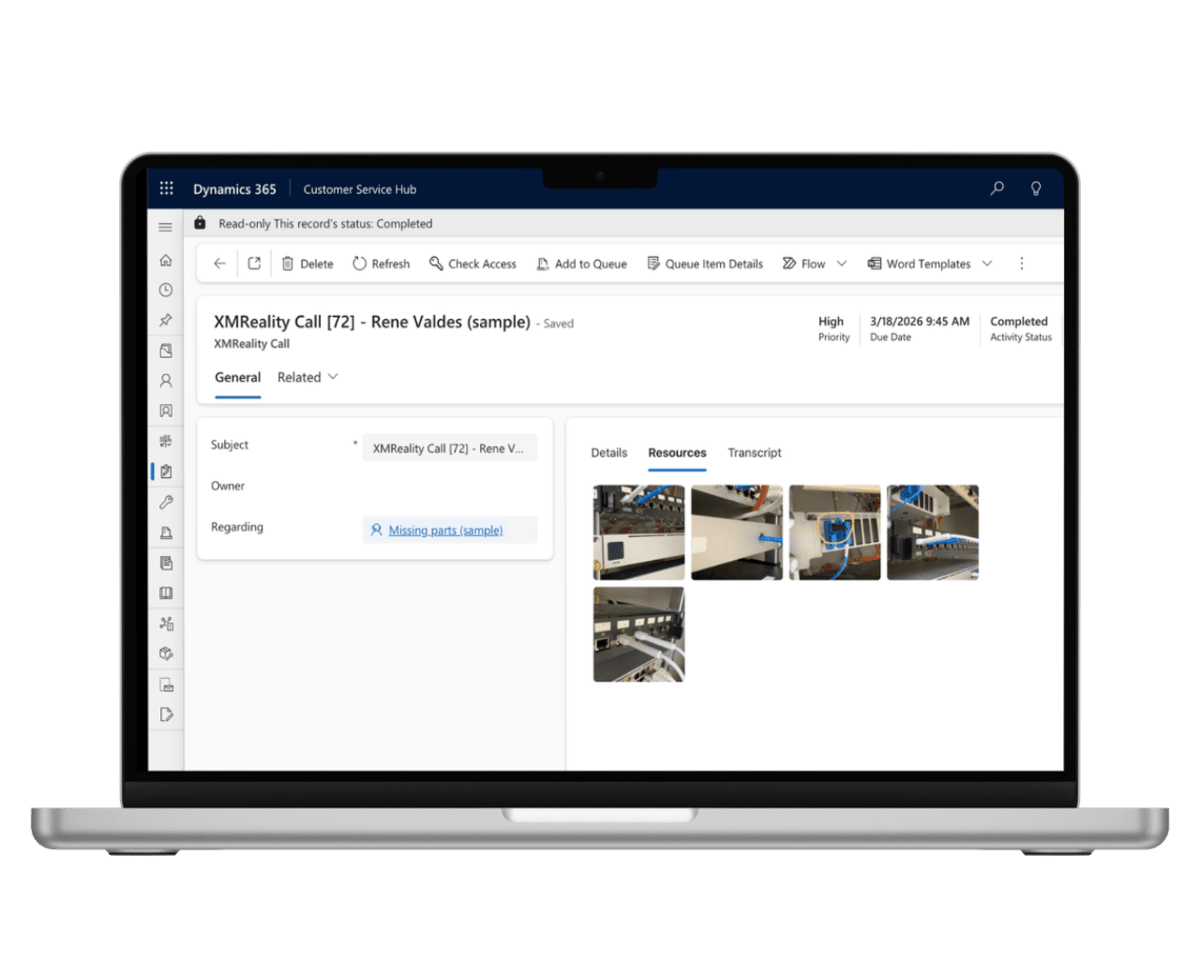
With XMReality for Dynamics 365, every support session becomes a fully documented asset, without a single manual upload.

Snapshots, annotated images, and call transcripts are instantly attached to the correct record in real-time. This creates a living library of visual solutions, allowing your team to build smarter routines, share best practices, and drive faster resolutions across the entire service organization.

Features for technical support

One-click calling from Dynamics

Launch video calls directly from any Dynamics Case or Work Order. Your customers join instantly via their browser—no app downloads or registrations required.

High-precision remote inspections

Get eyes on the ground with high-definition zoom. Perform detailed inspections and ensure first-time fixes without leaving Dynamics.

Integrated AR guidance

Use our AR-features to guide field technicians or customers with live pointers, annotations and AR-powered hands overlay. Clear instructions lead to faster case resolutions.

Smart visual capture

Freeze live video to capture high-resolution snapshots. Every image and video recording is automatically synced and attached to the corresponding Dynamics record.

Multi-expert collaboration

Bring specialized knowledge into any case. Invite up to 20 internal or external experts to solve complex issues together, integrated into your service flow.

Automated documentation

All call details, images, video recordings, transcripts, notes, and AI summaries are instantly available within Dynamics for a complete audit trail.


Frequently Asked Questions

What is the XMReality Dynamics 365 integration?

It is a seamless integration that embeds XMReality’s video support software directly into the Microsoft Dynamics 365 interface. It allows users to start video calls from within Dynamics and automatically syncs all session data back to that record.

Can I use XMReality as a replacement for Microsoft Remote Assist?

Yes. With Remote Assist being retired, XMReality offers a more flexible, browser-based alternative that doesn't require HoloLens or specific app installs for the end-user, while maintaining the deep integration into the Dynamics ecosystem you rely on.

Unlike Remote Assist, we are hardware-agnostic. While we support HoloLens, we also offer native support for leading industrial smart glasses like RealWear and Vuzix, as well as any standard smartphone or tablet.

Do my customers need to download an app to receive support?

No. One of the core benefits of XMReality is that your end customers or field technicians join the video call via a standard web browser on their mobile device. No registration or app installation is required.

Do all my Dynamics users need an XMReality license?

No. Only the users who need to initiate or make XMReality video calls require a license. The call history, images, and documentation are visible to all Dynamics users with the appropriate permissions, regardless of whether they have an XMReality license.

Does XMReality work with custom Dynamics apps?

Yes, XMReality is designed for maximum flexibility within the Microsoft ecosystem. While it works seamlessly with standard modules like Customer Service Hub, Field Service, and Sales Hub, it is also fully compatible with custom Model-Driven apps.

Since the integration is built on the Power Platform, you can easily add the XMReality component to your own custom-built apps, specialized forms, or unique business entities. This ensures your team can access remote support tools regardless of how tailored your Dynamics 365 environment is.

Can I try XMReality in Dynamics?

Yes, there are two ways to explore and evaluate XMReality before buying, depending on what you want to achieve:

  • To explore XMReality features: If you are primarily interested in testing our remote guidance features, you can sign up for a 14-day free trial on our website. 
  • To trial XMReality inside Dynamics: Since every Dynamics environment is unique, we recommend that you reach out to our sales team. We will help you set up a trial for you.

Where is call documentation stored?

All text-based documentation, including notes, transcripts, and summaries, is always synced automatically to Dynamics.

To view images and recordings directly within Dynamics, cloud storage is required. We currently support both XM Cloud Storage and Microsoft OneDrive.

What data is synced to Dynamics?

All documentation is synced automatically. Text-based data, including notes, transcripts, and summaries, is attached directly to the specific record used to launch the call.

Please note that while high-resolution snapshots and video recordings are also synced, they require cloud storage (XM Cloud Storage or Microsoft OneDrive) to be viewed directly within the Dynamics interface.

How do XMReality ensure security and GDPR compliance?

All data is encrypted both in transit and at rest. Our cloud infrastructure and processes are fully compliant with GDPR regulations and certified under the ISO 27001 information security standard.

Your data is stored securely and centrally on XMReality’s managed cloud infrastructure. If needed, you can even set up XMReality to only stored data locally on your device, or on your own Microsoft OneDrive account.

Why should I add XMReality video calls to MS Dynamics?

Because it turns a simple video call into a permanent part of your business intelligence.

  • See the Problem:  Stop relying on verbal descriptions. With XMReality, your experts see exactly what the customer sees, using hand overlays and drawing tools to guide repairs in real-time.
  • Zero-Friction: Your customers join instantly via their mobile browser—no app downloads or registrations required.
  • Auto-Sync Documentation: Stop manual data entry. Every photo, recording, and note is automatically attached to the correct Case or Work Order in Dynamics.
  • Audit-Ready: Even team members without an XMReality license can view the call history and documentation directly in the CRM, ensuring a complete and transparent service trail.

Is this integration right for my organization?

This integration is designed for forward-thinking organizations that already use Microsoft Dynamics 365 (Field Service, Customer Service, or Sales) and want to modernize their support capabilities. It is particularly essential for:

  • Remote assist users: Any company currently using or considering Microsoft Remote Assist that needs a reliable, feature-rich, and easy-to-deploy successor.
  • Field service teams: Organizations looking to reduce "no-fault-found" truck rolls by diagnosing issues accurately before a technician is dispatched.
  • Technical support centers: Teams handling complex hardware or machinery queries where verbal descriptions aren't enough, and "seeing what the customer sees" is critical.
  • Manufacturing and OEM: Companies providing global remote expertise to local technicians or end-customers without requiring them to install complex software.

Step-by-step instructions

Get it right, every time

Step-by-step instructions

Standardize your remote support and eliminate guesswork. Use our Step-by-Step Instructions to push customizable checklists to the user’s view during a call. It’s a powerful tool for maintaining quality control while offering your customers crystal-clear visual guidance.

Custom Branding

Your brand, every step of the way

Use branding to make a professional impression

With XMReality for Dynamics, you can customize the branding and design so your customers feel trust in every interaction. Add your logo and make your own text adaptations both before and after a call.